

In any modern workspace, how you work is just as important as the work you do. Long hours spent reviewing plans, specs, and spreadsheets can take a toll on your posture, focus, and productivity. That’s where an ergonomic office desk makes all the difference — especially when it’s designed for professionals who live in the details of large-format documents.
At iPlanTables, we’ve transformed traditional workstations into dynamic, touch-enabled, ergonomic solutions that allow you to work comfortably — whether sitting, standing, or collaborating. Built for plan reviewers, examiners, architects, and engineers, our ergonomic desks combine adjustability, wide-format touchscreen technology, and smart design to create a truly better-than-paper workflow.
What Makes an Office Desk “Ergonomic”?
An ergonomic office desk is designed to support the natural posture and movement of your body while working. Features like adjustable height, tilting surfaces, and proper monitor placement reduce strain on your back, neck, and wrists. iPlanTables takes this further by integrating large-format touchscreen displays that minimize repetitive movements like zooming and scrolling — making plan review tasks more efficient and comfortable.
Why Should I Switch to an Ergonomic Desk Setup?
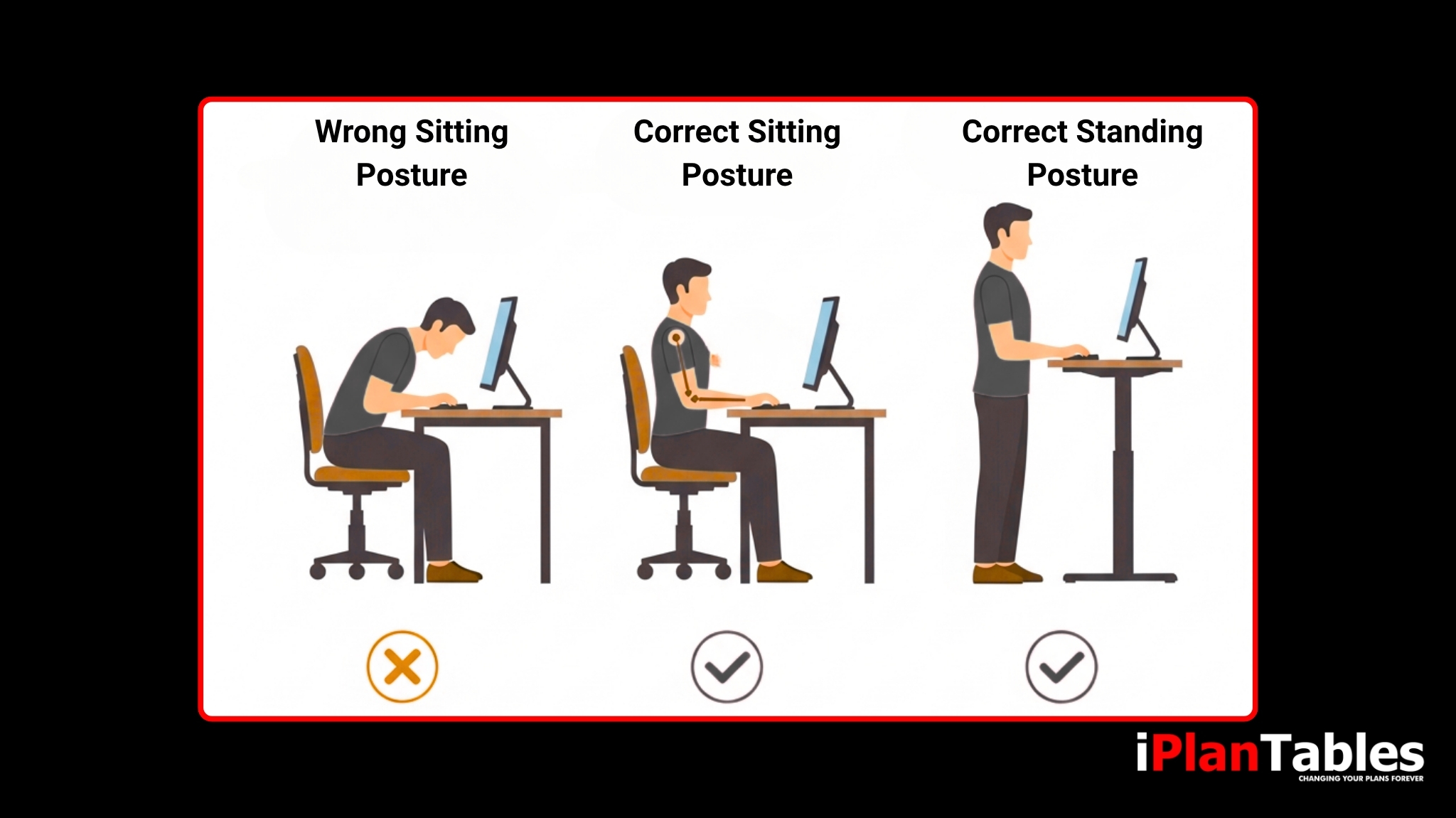
Traditional desks often force you into static positions, which can lead to discomfort and fatigue. An ergonomic desk setup promotes movement and healthy posture throughout your workday. With iPlanTables’ sit-stand and touchscreen models, you can alternate between sitting and standing positions, keeping your energy levels high and your focus sharp — especially during long project review sessions.
How Do iPlanTables Ergonomic Desks Differ From Regular Office Desks?
Unlike standard desks, iPlanTables ergonomic office desks are built for professionals who work with detailed construction plans, specs, and large-format documents. Our workstations combine ergonomic design with digital efficiency. Here’s what sets them apart:
Built for Collaboration:
Share, mark up, and review plans with your team in real time for faster decision-making and better project communication.


Multi-Use Design Options:
Choose from sit-stand desktop models, wall-mounted configurations, or conference room setups to fit your workspace needs.
Paperless Workflow:
Eliminate the hassle of handling large paper plans and move seamlessly to a fully digital environment.


Adjustable Touchscreen Surface:
Easily tilt or raise your touchscreen display for comfortable viewing — whether sitting or standing.
Wide-Format Digital Display:
View entire drawings, blueprints, or spreadsheets at once without constant panning or zooming.

Each iPlanTables workstation is designed not just to replace your desk — but to transform how you interact with your work.
Can Ergonomic Desks Really Improve Productivity?
Absolutely. Studies show that comfortable, movement-friendly work environments reduce fatigue and increase focus. When you pair that with iPlanTables’ wide-format touchscreen capabilities, you spend less time searching, scrolling, and zooming — and more time making informed project decisions. The result? Better collaboration, faster plan reviews, and improved project outcomes.
Are Ergonomic Office Desks Suitable for Collaborative Work?
Yes, and that’s one of their biggest advantages — especially with iPlanTables.
Collaboration features include:

Multi-user touchscreen capability for simultaneous input.

Digital markups and annotations are visible to your entire team.
Seamless integration in conference rooms or training environments.
Effortless screen sharing for remote collaboration.
This makes reviewing and approving plans faster and more interactive than ever.
What Should I Look for When Buying an Ergonomic Office Desk?
Before choosing your ergonomic desk, consider these factors:
Adjustability: Look for desks that let you switch between sitting and standing easily.


Surface space: Ensure it supports your screen size and working style.
Durability: Heavy-duty builds last longer and handle professional workloads.


Technology integration: For digital professionals, touchscreen compatibility and cable management are essential.
User comfort: Test angles, heights, and accessibility for your daily tasks.

iPlanTables offers fully customizable setups that check all these boxes — built to fit your exact workflow needs.
How Do I Maintain an Ergonomic Workspace?
Creating an ergonomic workspace is about more than just choosing the right desk—it’s also about developing healthy work habits. Adjust your desk height regularly throughout the day to encourage movement and reduce stiffness. Keep your monitor positioned at eye level to prevent neck strain, and take short breaks every hour to stretch or walk.
Pairing your setup with an ergonomic chair that supports your lower back can make a significant difference in comfort. Finally, keeping your workspace neat and organized helps minimize distractions and maintain focus. When combined with an iPlanTables ergonomic desk, these habits ensure you work smarter, stay comfortable, and maintain lasting productivity.
Experience Ergonomics Redefined
Upgrade your workspace to match your workflow. Explore iPlanTables’ line of ergonomic office desks and discover how comfort and productivity go hand in hand.